
AI Knowledge Sources: What Your AI Is Allowed to Learn in eDirectory 14.0
Introduction
With the release of eDirectory version 14.0, administrators gain more control over how AI enhances search results through the new AI Knowledge Sources feature. This functionality allows you to define trusted external and internal content that the AI can use as context to generate richer, more helpful summaries—without ever stepping outside the listings stored in your directory.
This article explains what AI Knowledge Sources are, how they work, their prerequisites, and how to manage them effectively to improve the AI-powered summary on search pages.
Important Notes (Required Setup)
For this feature to work correctly, you must first:
-
Integrate your site with ChatGPT
Please refer to the dedicated article How to Integrate Chat GPT with eDirectory 14 for step-by-step instructions.
-
Integrate your site with Qdrant
Please refer to the article How to configure Qdrant in eDirectory 14 for setup details.
-
Enable AI-powered summary on search pages
In order to enable the AI-powered summary, please, refer to the article How Your AI-Powered Search Summary Works in eDirectory 14.0 for setup details.
Instructions for this setup can be found in this article.
⚠️ Without these integrations properly configured, AI Knowledge Sources will not function as expected.
What Are AI Knowledge Sources?
AI knowledge sources define where the AI is allowed to learn extra context from when generating summaries on search results pages.
These sources:
-
✅ Do not replace listing data
✅ Are used only to add richer explanations, such as:
- Usage tips
- Editorial guidance
- Neighborhood, traffic, or safety context
- ❌ Do not allow the AI to recommend businesses that are not in your directory
🔒 Important rule:
The AI always stays within the universe of listings returned by the search.
External knowledge sources are used only to complement context, never to invent or suggest new places.
Accessing the AI Knowledge Sources Page
- Log in to the Site Manager (sitemgr)
- Go to Configuration → AI Settings → AI knowledge sources
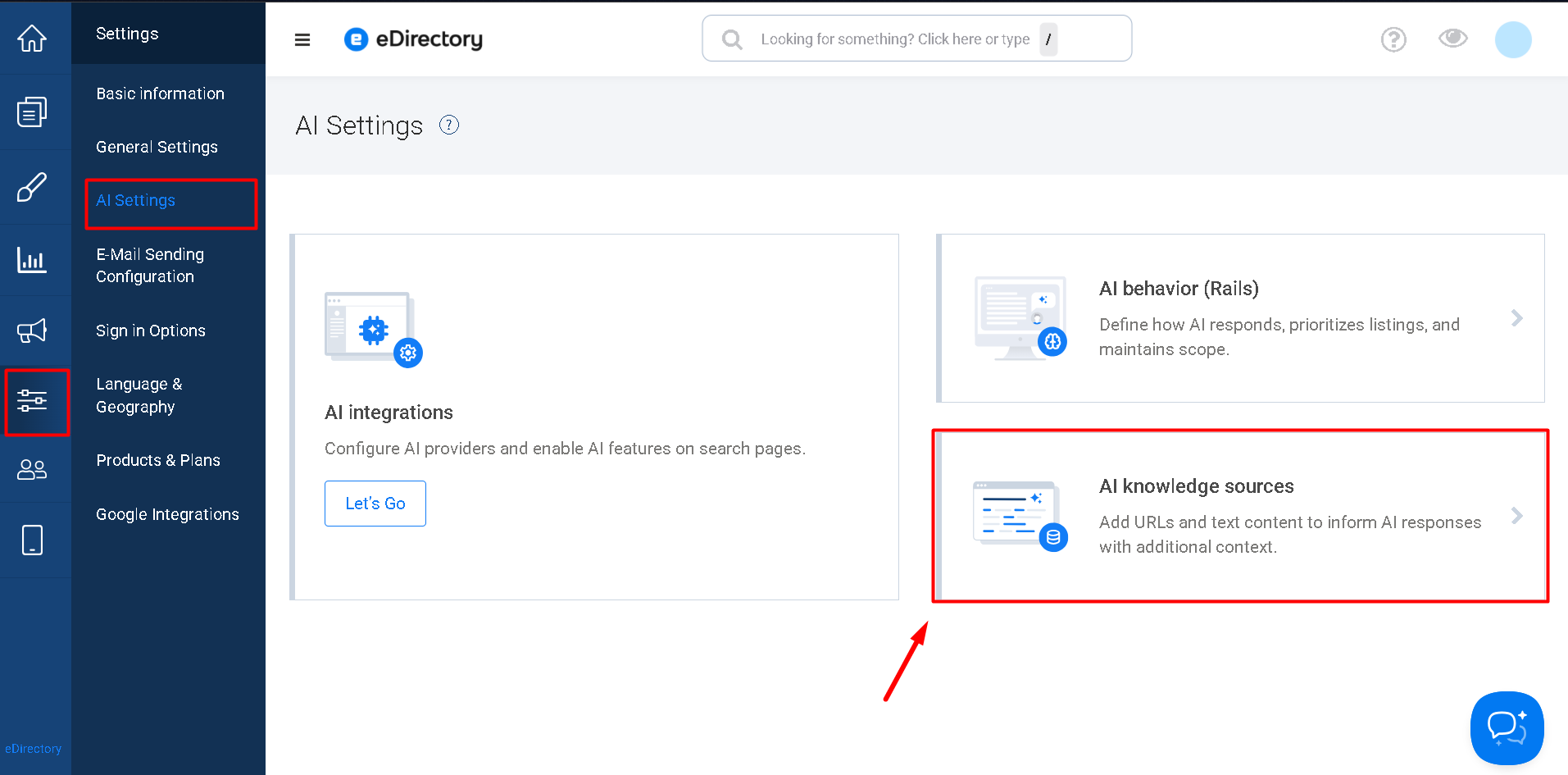
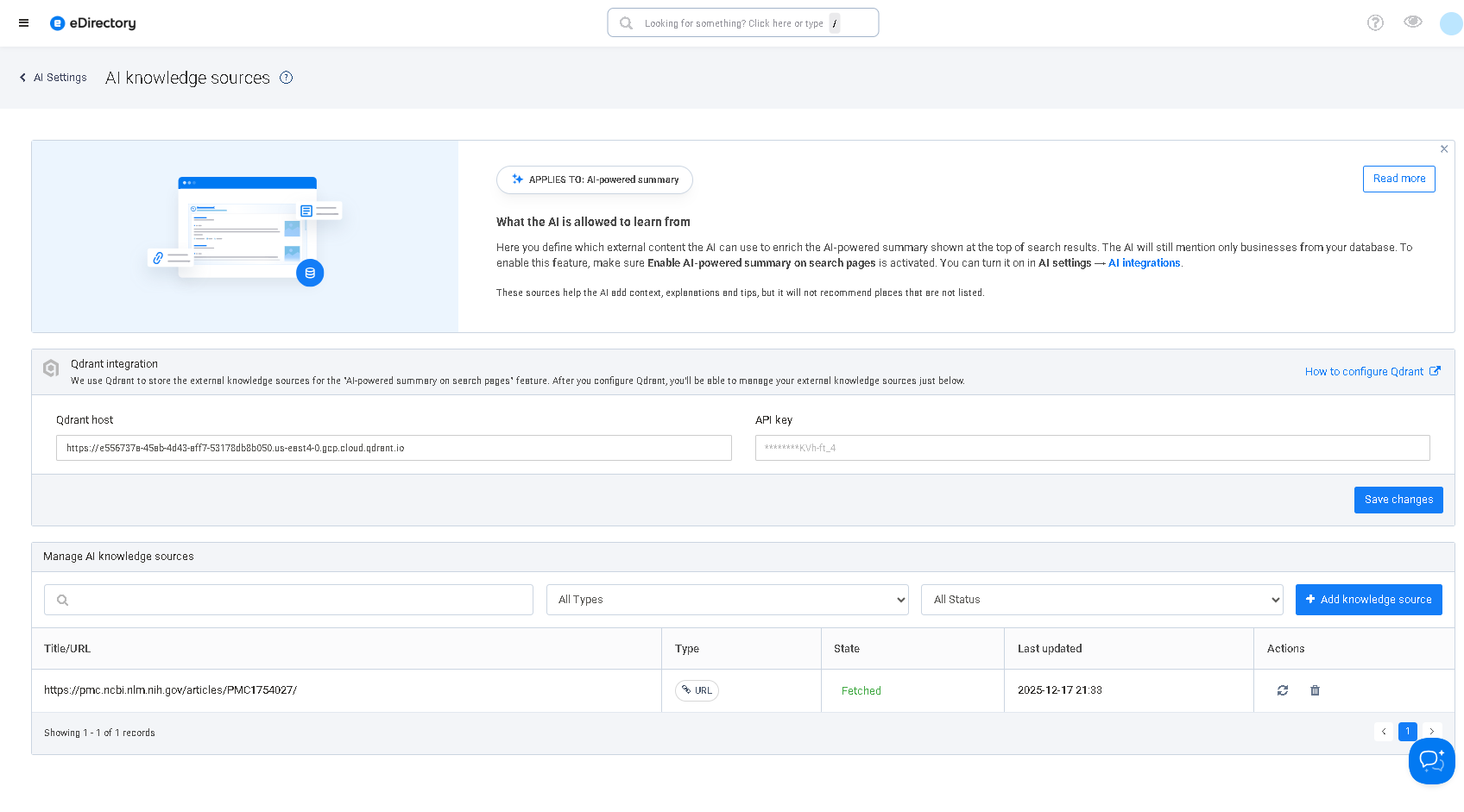
- You will see:
- A panel related to Qdrant integration
- The Manage AI knowledge sources section, including filters, a list of sources, and available actions
What the AI Can Learn From These Sources
Using AI Knowledge Sources, the AI can learn contextual information such as:
- General tips about business categories (e.g., how to choose a restaurant on a rainy night)
- Neighborhood and regional insights:
- Area profile (gastronomic, residential, nightlife, etc.)
- Traffic, access, and safety considerations
- Editorial recommendations and admin-created content
Important Limitations
Even with these sources enabled, the AI:
- Only mentions listings returned by the search
- Does not create, invent, or recommend businesses outside the directory
- Treats knowledge sources as context, not instructions to override system rules
Types of AI Knowledge Sources You Can Add
In the Manage AI knowledge sources section, you can register two main types:
URL
Use this option when you already have relevant content published online, such as:
- Blog posts
- Help articles
- Local guides
How it works:
- You provide a public URL
- The system fetches and processes the page content
- The text is converted into vectors and stored in Qdrant
- The AI retrieves this information semantically when related searches are performed
⚠️ Some websites may block content reading. If the source returns an error, use the Raw text option instead.
Raw Text
Use this option when you want to write the content directly in the admin panel, for example:
- Editorial tips
- City- or region-specific policies
- Internal guidelines not published publicly
You provide:
- A Title
- A Text Content
This content is indexed in Qdrant and used as contextual knowledge for the AI.
Understanding Filters and Source Status
In the AI knowledge sources table, you will find:
Filters
- Text search (by title or URL)
- Type: All Types, Raw text, URL
- State: All Status, Fetched, Error

Main Columns
- Title / URL – Name or address of the source
- Type – Raw text or URL
- State
- Fetched – Successfully processed and ready for use
- Error – A problem occurred during fetching or processing
- Last updated – Date of creation or last update
- Actions – Edit, Reindex, or Delete

Adding a New AI Knowledge Source
Option A – Add a URL Source
Recommended when you already have high-quality public content.
Step by step:
- Click Add knowledge source
- Select URL
- Enter the content URL
- Save
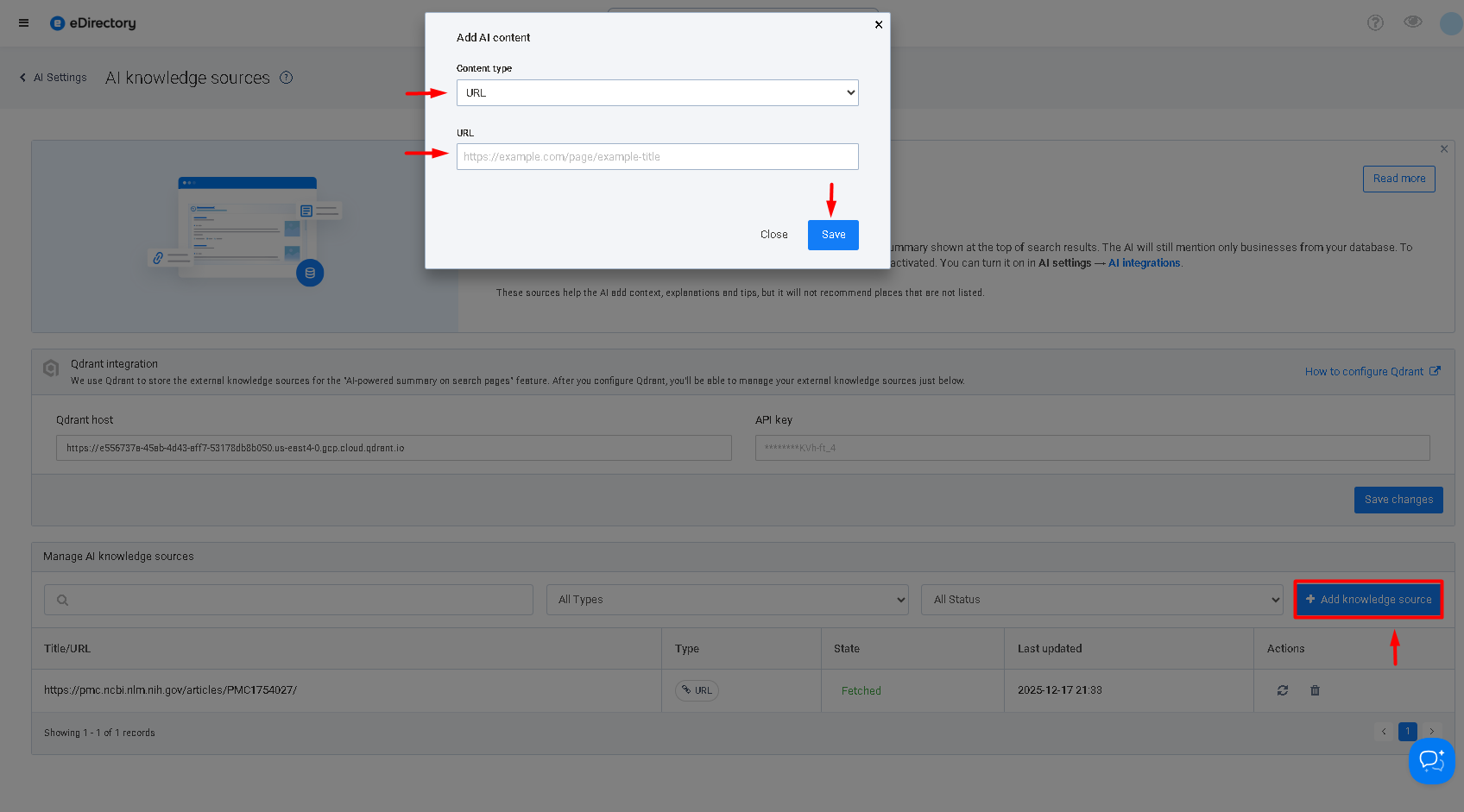
After saving:
- The system fetches and indexes the content
- The source should appear with:
- Type = URL
- State = Fetched

If the state shows Error:
- Check whether the URL is publicly accessible
- Confirm the page contains sufficient textual content
- Use Refresh / Reindex after correcting the issue
Option B – Add a Raw Text Source
Recommended for custom or internal content.
Step by step:
- Click Add knowledge source
- Select Raw text
- Fill in:
- Title – clear and descriptive
- Content – the text the AI may use as context
- Save
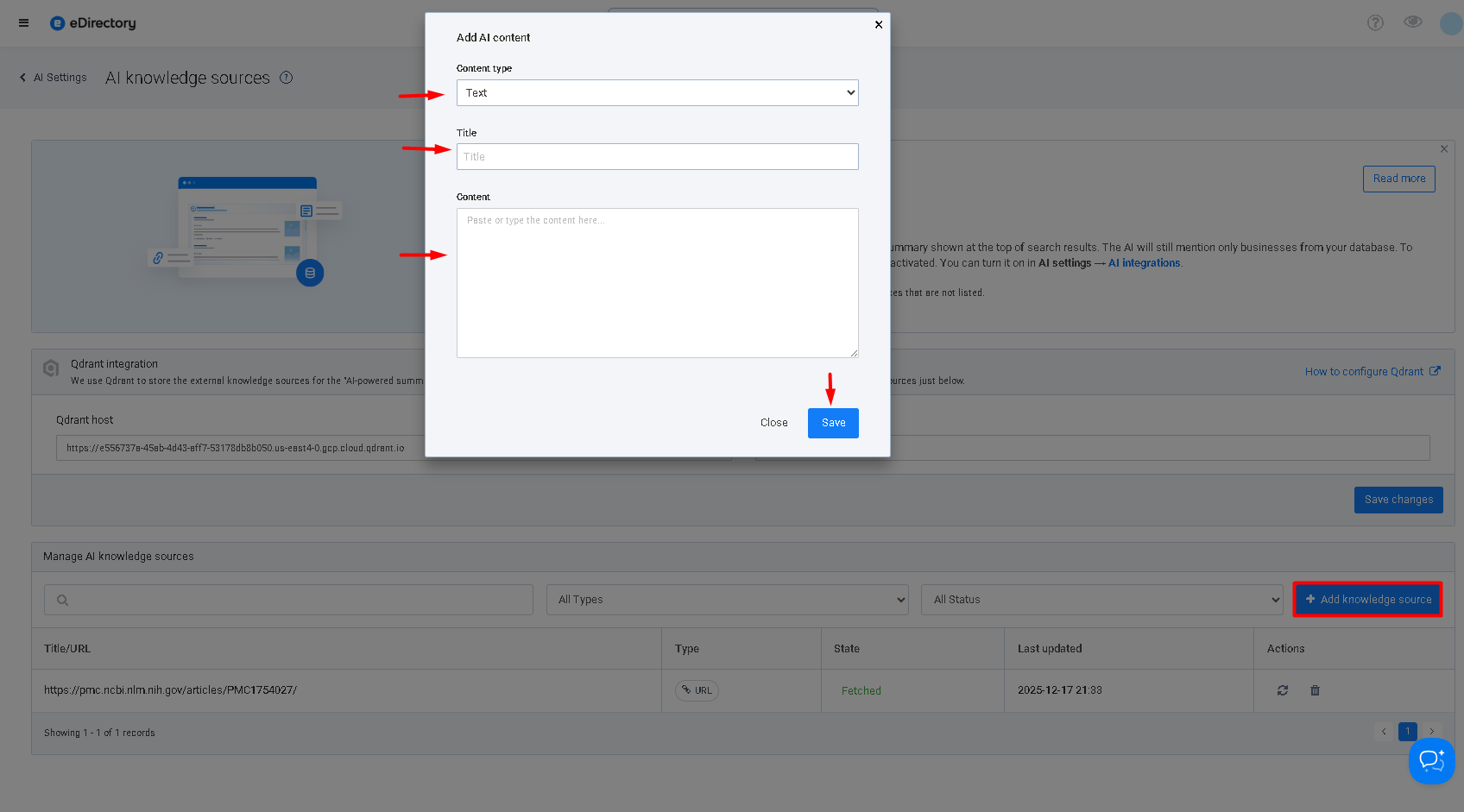
Once processed, the source should appear with:
- Type = Raw text
- State = Fetched
Editing, Reindexing, and Removing Sources
Each knowledge source includes the following actions:
Edit (Raw Text Only)
- Update the title or content
- Saving automatically reindexes the source
Refresh / Reindex (URL and Raw Text)
- URL: Fetches and processes updated page content
- Raw text: Ensures the latest version is indexed
Delete
- Permanently removes the source
- The content will no longer be used as AI context
Best Practices for AI Knowledge Sources
- Focus on content that complements listings
- Guides, FAQs, local tips, explanations
- Avoid overly generic material
- Specific, relevant content yields better AI summaries
- Keep time-sensitive information updated
- Traffic, construction, or regulation changes should be reviewed regularly
- Start small and curated
- A few high-quality sources are more effective than many broad ones
Conclusion
The AI Knowledge Sources feature in eDirectory 14.0 allows you to precisely control where the AI gets its contextual information—while ensuring it always stays within your directory’s listings.
By properly configuring integrations and curating relevant sources, you can:
- Enrich AI-powered search summaries with trusted context
- Monitor source processing status
- Edit, reindex, or remove knowledge as your directory evolves
In short, this feature defines what the AI is authorized to learn, helping you deliver smarter, more informative search experiences without compromising accuracy or control.